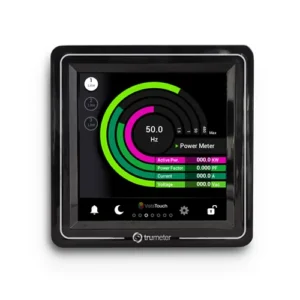
Trumeter’s Vista Touch series is a family of configurable touchscreen panel meters for OEM applications. Instead of forcing you to work around a fixed HMI, the Vista Touch display molds to your application. The video below highlights how the flexible platform adapts to your requirements.
Highlights:
- Rapidly tailor I/O, UI, and logic to your application
- Brand the interface and workflows to match your product
- Add remote monitoring and dashboards via Trumeter Cloud
- Get white-glove engineering support from concept to manufacture
For Builders of Serious Systems
The Vista Touch is the ideal solution for OEMs, design engineers, panel builders, and system integrators who need a branded, application-specific interface, without the expense, delays, or risk of developing a full custom HMI from scratch.
Whether you’re designing control panels for HVAC systems, automating production lines, or integrating monitoring solutions into commercial equipment, the Vista Touch gives you a flexible, professional-grade platform that looks and performs like a custom build.
Custom Control Without The Custom Cost
The Vista Touch bridges the gap between off-the-shelf convenience and full custom engineering. You get a configurable platform that feels bespoke to your end users, without the cost, risk, and lead time of a ground-up design.
Application-Matched I/O
Configure inputs and outputs to align with your system requirements. Typical examples include:
- Inputs: analog (e.g., 0–10 V, 4–20 mA), digital, pulse/frequency, temperature, and switches
- Outputs: digital relays, analog control, alarms, and communications signals
This setup lets you read what matters (sensors, meters, relays) and control what counts (pumps, fans, valves, sequences) without external band-aids.
Branded, Usable Interfaces
Build the UI around your operators:
- Customization: choose screens, layouts, and navigation for the specific workflow
- Branding: choose logo, colors, terminology, and component styles
- Contextual widgets: Use gauges, charts, status tiles, alarms, and KPIs
These features enable faster onboarding, fewer mistakes, and a product that looks like yours, not a generic off-the-shelf HMI.
Tailored Functionality & Logic
Modify the functionality to match your process:
- Mode selection, setpoint flows, and permission levels
- Sequencing, interlocks, and timing behaviors
- Data logging intervals and retention windows
You get the exact behavior your application demands, including specialty edge cases your industry lives with.
Remote Monitoring
The Trumeter Cloud lets you view live and historical data, alarms, and trends from anywhere:
- Fleet-level visibility for OEMs and service teams
- At-a-glance dashboards for operations and maintenance
- Event history for troubleshooting and continuous improvement
- Remote access to your devices is essential for reducing site visits, accelerating root-cause analysis, and improving uptime.
Easier Migration & Support
Switching to Vista Touch is intentionally straightforward:
- Requirements discovery: Document your signals, workflows, and user roles
- Prototype & iterate: Get clickable UI mockups, functional proofs, and pilot units
- Manufacture & scale: Receive consistent builds, documentation, and ongoing support
Trumeter’s team collaborates from concept through manufacture, so you can move quickly with less risk.
The Vista Touch Family: Process, Power & Flow
The Vista Touch platform isn’t a single display; it’s a family of three models built on the same flexible architecture, with each optimized for different measurement and control needs.
Each model shares the same powerful touchscreen interface, customizable UI, and Trumeter Cloud connectivity, so once you learn one, you can scale across applications without retraining or retooling.
Vista Touch Process
The Process model delivers precise monitoring for industrial control systems. It’s ideal for manufacturing lines, test equipment, or OEM process panels where you need to visualize temperature, pressure, level, or other analog process signals. Typical uses include:
- environmental chambers
- dosing systems
- machine automation
Vista Touch Power
The Power model focuses on electrical energy management, measuring, displaying, and logging data from single-, split-, or three-phase systems. Engineers use it to ensure efficiency, monitor demand, and protect critical loads. Typical uses include:
- switchgear panels
- backup power systems
- EV infrastructure
- industrial automation
Vista Touch Flow
The Flow model is purpose-built for liquid or gas measurement and pump control. It reads flow signals from pulse, analog, or turbine meters, and adds control logic for sequencing, alarms, and batching. Typical uses include:
- Water treatment
- HVAC pump systems
- food and beverage production
Whether you’re tracking electrical loads, process variables, or system flow, there’s a version ready to seamlessly adapt to your setup.
FAQ
Can we keep our existing sensors and controllers?
In most cases, yes. VT configuration focuses on matching your existing signals and workflows.
Do we need special software licenses to edit screens?
The Trumeter team handles configuration with you, so you’re not buying and training on a heavy HMI toolset unless you want to.
How does Cloud access work?
The Vista Touch can publish data to Trumeter Cloud for secure dashboards, alerts, and history. You choose what’s sent and who can see it.
What about long-term maintainability?
Each deployment includes documentation and revision control, so changes can be tracked and supported over time.
Next Steps
- Scope your project: Book a call with an applications engineer to review signals, screens, and control logic.
- See it in action: Request a tailored demo using your real I/O and sample workflows.
- Plan remote visibility: Explore Cloud dashboards for alarms, trends, and multi-site monitoring.