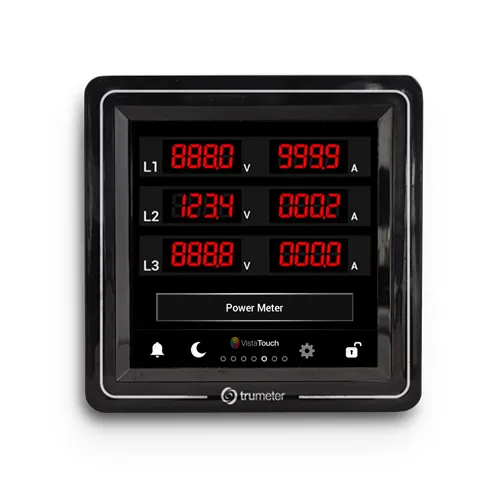
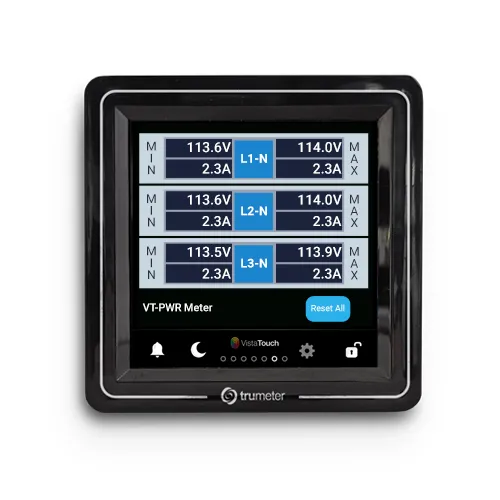
Power is the backbone of every data center. From server racks and cooling systems to redundancy paths and backup infrastructure, power behavior in data centers directly affects uptime, performance, and operational trust. In environments where even small fluctuations can have outsized consequences, teams need power data that is accurate, visible, and easy to interpret.
The Vista Touch Power from Trumeter is a panel-mounted power and energy meter designed for these real-world conditions. It delivers clear, centralized power visibility inside control panels, PDUs, and distribution cabinets where data center teams actually work.
Key Features

- Built-in remote monitoring with free subscription to Trumeter Cloud
- 1% accuracy across the input range
- Vibrant, full color 70mm x 70mm [2.76″ x 2.76″] graphics display
- Load and save configuration data to a USB flash drive
- Industry standard ¼ DIN mounting
- Local data logging through USB
Power & Energy Monitoring in Today’s Data Centers
Power monitoring isn’t just about collecting data. It’s about understanding and managing power behavior in data centers as loads constantly change throughout the day. In practice, power meters support daily operations by:
- Displaying voltage, current, frequency, and power values at a glance
- Tracking load behavior across feeders, panels, or critical equipment
- Identifying imbalances or abnormal conditions before they escalate
- Supporting uptime, efficiency, and long-term capacity planning
Without reliable, local visibility, issues can go unnoticed until alarms trigger elsewhere, or until systems fail.
Key Power Parameters Measured
In data centers, power monitoring is most valuable when it delivers clear insight into electrical parameters that directly affect uptime, load balance, and system stability. The Vista Touch Power is designed to present these critical measurements in a single, accessible display at the panel.
Voltage
Voltage readings help teams verify stable supply levels across phases and detect deviations that could impact sensitive IT and cooling equipment.
Current
Current monitoring provides visibility into load levels on individual feeders or circuits, supporting capacity planning and early detection of overload conditions.
Frequency
Frequency measurement confirms power stability and can indicate upstream issues before they affect connected systems.
Real and Apparent Power
Tracking real power (kW) and apparent power (kVA) helps teams understand actual energy usage versus total load, supporting more accurate efficiency assessments.
Power Factor
Power factor visibility helps identify inefficient load behavior that can increase losses and strain infrastructure.
Energy Consumption
Energy measurements allow teams to track usage over time, supporting reporting, optimization efforts, and operational benchmarking.
Common Power Monitoring Challenges
- Dense electrical infrastructure with limited space for additional devices
- Constrained panel space in PDUs and distribution cabinets, especially in expanded or retrofitted systems
- Power data spread across basic meters, legacy displays, or remote monitoring systems
- Limited immediate access to critical power information during maintenance or troubleshooting
- Multiple power sources and redundancy paths increasing system complexity
- Constantly changing load profiles that are difficult to track without clear, local visibility
- Ongoing need for fast, readable power data for on-site engineers and technicians
These challenges highlight the need for a centralized, modern power display that integrates cleanly into existing panel designs.
How the Vista Touch Power Turns Data into Insight
Data center power systems rely on layered visibility. While centralized platforms handle aggregation and analytics, local power insight at the panel remains critical for day-to-day operations, maintenance, and troubleshooting. The Vista Touch Power is designed to strengthen this local layer without disrupting existing system architecture.
Integrates Into Standard Panel Builds
- Installs directly into standard panel configurations used in PDUs, switchgear, and distribution panels
- Fits cleanly into existing layouts without requiring major redesigns
Centralized, Readable Power Display
- Consolidates key electrical measurements into a single touchscreen interface
- Reduces the need for multiple meters or fragmented readouts
Local, Real-Time Power Visibility
- Displays critical power data directly at the panel
- Supports faster interpretation during commissioning, maintenance, and troubleshooting
Built for Continuous Operation
- Designed for industrial environments with continuous 24/7 operation
- Suited for the reliability demands of data center infrastructure
Complements Higher-Level Monitoring Systems
- Works alongside SCADA, BMS, and centralized monitoring platforms
- Strengthens the visibility layer closest to the electrical system rather than replacing it
Together, these capabilities give data center teams clearer, more dependable power visibility.
Local and Remote Power Monitoring
Data centers rely on layered power visibility. Local displays provide immediate insight at the panel, while remote systems support centralized monitoring and long-term analysis.
The Vista Touch Power supports this approach by delivering real-time power data locally while also integrating into remote monitoring platforms. When connected to the Trumeter Cloud, power data can be accessed remotely for trending, oversight, and multi-site visibility, without replacing the need for panel-level confirmation.
Power Clarity for Critical Operations
Data center teams choose the Vista Touch Power for its balance of clarity, reliability, and seamless integration into existing electrical systems. By delivering accurate power data in a single, readable display, it reduces panel congestion, avoids unnecessary complexity, and supports confident decision-making in environments where power stability is mission critical.
To explore specifications, configuration options, or application guidance, visit the Vista Touch Power product page or click the blue contact button for support.